Network Optimization Strategies for Home Connected Devices
The Importance of Network Optimization
In an age where every facet of our lives seems to embrace technology, network optimization has transitioned from a technical luxury to an essential requirement for modern homes. With a myriad of connected devices—from smart thermostats controlling your home’s climate, to security cameras ensuring your family’s safety—the demand for bandwidth has increased exponentially. Imagine a scenario where multiple devices are streaming videos, gaming, and operating simultaneously. Under such pressure, an unoptimized network can falter, causing frustrating lags and dropouts that disrupt daily activities.
Assessing Your Internet Service Provider Plan
The first step towards achieving strong network performance is to consider your Internet Service Provider (ISP) plan. Take time to evaluate your current internet plan. Are you receiving the speeds that were promised? Checking your plan’s specifications and daily usage can reveal a lot about whether it meets your household needs. For instance, a household with several family members each streaming content in 4K will require a higher bandwidth plan compared to a single-user home. Most ISPs offer ample resources that can help you gauge your needs based on household size and activities.
Investing in Quality Networking Hardware
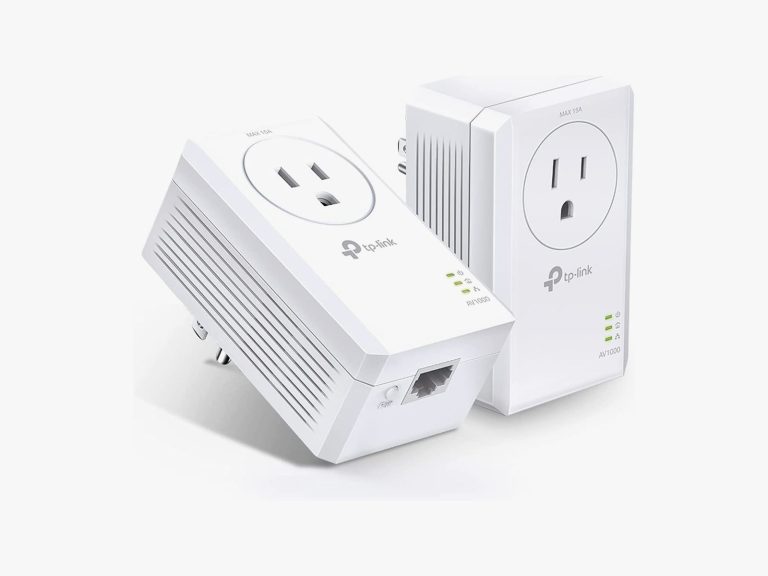
Another critical element to optimize your home network is the investment in quality networking hardware. A robust router acts as the backbone of your home network, making it essential to choose one that can handle your requirements. For instance, routers with dual-band capabilities can help manage multiple device connections more effectively, allowing some devices to utilize the 5 GHz band for less interference and faster speeds. Moreover, adding extenders or mesh systems can ensure greater coverage, eliminating those dead zones in larger homes where Wi-Fi still seems elusive.
Prioritizing Device Connections
It’s not only about raw speed; how you manage bandwidth can also significantly impact performance. Prioritizing device connections allows you to dictate which devices receive the highest priority for data transfer. For example, if you’re working from home and need stable connectivity for video conferencing, you can adjust your settings to prioritize your laptop over smart devices that might not need much bandwidth at that moment. Many modern routers offer Quality of Service (QoS) features that automatically make these adjustments based on your usage and preferences.
Employing these strategies can lead to noticeable improvements in streaming quality, enhanced download speeds, and overall better network performance. The stakes are not just about speed; stability and security truly matter in a networked world. With security breaches continuously on the rise, ensuring that you have a well-optimized network can also safeguard personal information tied to those smart devices.

In this article, we will delve deeper into methods to optimize your home network, focusing on popular devices like smart TVs, home assistants, and various IoT (Internet of Things) gadgets. Whether you are a seasoned tech enthusiast or simply someone hoping to maximize your home internet experience, the optimization strategies discussed here will equip you with the knowledge to significantly enhance your digital lifestyle. Join us as we uncover the intricacies of home network optimization so you can enjoy a seamless, hassle-free technology experience.
DISCOVER MORE: Click here for essential tips
Enhancing Your Network Performance
With homes becoming increasingly connected, the need for optimized network performance is paramount. A comprehensive understanding of network optimization strategies can significantly enhance user experience and connect diverse devices seamlessly. It is no longer sufficient to simply have an internet connection; maximizing that connection is essential for efficient functioning, particularly in households where multiple devices operate simultaneously.
Understanding Your Network Environment
The first step in enhancing your home network is to assess your network environment. Start by mapping out the locations of your connected devices and noting any areas where the signal is weak or nonexistent. Several factors can affect your network’s performance, including:
- Physical obstructions: Walls, furniture, and other physical barriers can diminish Wi-Fi signals.
- Interference from other electronic devices: Household electronics like microwaves, wireless phones, and baby monitors can cause interference.
- Network congestion: Multiple devices streaming, downloading, or gaming can lead to competition for bandwidth, hindering speed.
By identifying these issues, you can take steps to mitigate their impact—such as relocating your router to a more centralized position within the house or minimizing interference from other electronic devices.
Regularly Updating Firmware and Software
Another crucial aspect of network optimization is maintaining updated firmware and software for your networking devices. Manufacturers periodically release updates that improve functionality, enhance security, or address potential issues. Failing to keep this software current may leave your network vulnerable to security breaches or performance problems. Checking for updates on a regular basis is not only a best practice but an essential step towards safeguarding your home network.
Utilizing Network Optimization Tools
There are various network optimization tools available that can assist you in managing and improving your network performance. These tools can help diagnose issues, monitor traffic, and provide valuable insights about your connected devices. Some popular options include:
- Speed Test Applications: Use apps like Ookla or Fast.com to regularly check your internet speed and ensure you’re receiving the service your ISP promised.
- Network Analysis Tools: Tools such as NetSpot can provide detailed analyses of your Wi-Fi network, identifying signal strength and coverage areas.
- Traffic Management Software: Software solutions like PRTG or SolarWinds enable you to monitor network performance in real-time and manage bandwidth distribution effectively.
Implementing these tools offers a deeper understanding of your network, allowing you to make more informed decisions regarding upgrades and hardware adjustments.
As we explore further optimization strategies, you’ll find that these proactive steps empower you to create a robust and reliable network that can handle the demands of a connected lifestyle, ensuring you enjoy the convenience and comfort that smart home technology offers.
| Advantage | Description |
|---|---|
| Enhanced Bandwidth Management | Improving bandwidth allocation allows multiple devices to operate simultaneously without lag, maximizing the performance of home networks. |
| Increased Device Security | Implementing strategies like network segmentation can significantly reduce vulnerabilities, protecting sensitive data across all devices in your home. |
As the prevalence of smart devices increases in homes, understanding tailored network optimization strategies becomes essential. Enhanced bandwidth management addresses a common issue faced by families with multiple connected devices, ensuring activities like streaming and online gaming occur without interruptions. Coupled with network segmentation, increased device security minimizes exposure to cyber-attacks. Optimizing your home network not only boosts performance but also creates a safe environment for all users, enhancing the overall experience with connected devices. Let’s delve into practical tips on how to implement these strategies effectively, ensuring superior performance and robust protection for your digital environment.
DISCOVER MORE: Click here to learn essential tips
Maximizing Bandwidth Utilization
In a world where multiple devices are connected to the internet simultaneously, maximizing bandwidth utilization becomes a critical strategy for network optimization. Households are now filled with smart televisions, gaming consoles, laptops, tablets, and IoT devices, all of which can consume considerable bandwidth. Understanding how to manage and allocate bandwidth effectively can make a significant difference in overall network performance.
Implement Quality of Service (QoS)
One of the most effective ways to ensure that your devices run smoothly is by implementing Quality of Service (QoS) settings on your router. QoS allows you to prioritize bandwidth for specific applications or devices based on their needs. For instance, streaming HD content or online gaming typically requires more bandwidth than browsing social media. By configuring QoS, you can ensure that high-priority devices receive the necessary bandwidth, reducing lag and buffering times. Most modern routers include QoS features that can be accessed through the device’s settings page, allowing you to customize which devices or applications get priority.
Mesh Networking Solutions
For larger homes or spaces with challenging layouts, employing a mesh networking solution can enhance coverage and maintain consistent speeds. Unlike traditional extenders, which can slow down the network, mesh systems consist of multiple nodes that work together to create a unified network. This approach minimizes dead spots by ensuring that your connected devices always communicate with the strongest signal. Popular mesh networking kits, such as Google Nest Wi-Fi and Eero, offer easy setup and management through mobile apps, making them an ideal solution for tech-savvy homeowners and novices alike.
Adjusting Wi-Fi Channels
The channel your Wi-Fi operates on can significantly influence network performance, particularly in densely populated areas where many networks might be competing for similar frequencies. Most routers default to a specific channel, which can lead to interference and reduced speeds when nearby networks overlap. Utilizing a Wi-Fi scanner tool—such as Wi-Fi Analyzer or NetSpot—can help you identify which channels are less congested. By adjusting your router to a more optimal channel, you can reduce interference and enhance your network’s stability.
Segregating Your Network
Creating distinct networks for specific devices is another effective strategy. Many modern routers feature options to create a guest network or segregated network specifically for IoT devices. This setup not only improves overall performance but also enhances security, keeping your primary devices safe from potential vulnerabilities associated with less secure smart devices. For example, if your smart thermostat or security camera is compromised, it won’t put your personal laptops or smartphones at risk.
Regular Network Assessments
Finally, regularly conducting network assessments is vital in ensuring optimal performance over time. Periodically reevaluating your network’s speed and reliability allows you to spot trends and identify new issues as your number of connected devices continues to grow. Many mesh systems and advanced routers offer built-in analytics to help users understand their bandwidth usage, enabling proactive adjustments to address any new challenges.
As the number of devices you connect to your home network expands, implementing these optimization strategies allows you to maintain a seamless experience. An active approach to managing your network can set the foundation for an uninterrupted, reliable, and efficient smart home environment.
DON’T MISS: Click here to learn how to save on cloud storage
Conclusion
In conclusion, as homes become increasingly outfitted with smart devices, network optimization strategies play a crucial role in ensuring a seamless and efficient digital environment. By understanding and implementing techniques such as Quality of Service (QoS), mesh networking, and channel adjustment, homeowners can dramatically enhance their internet experience. These strategies not only maximize bandwidth utilization but also improve overall security by segregating networks for IoT devices.
The dynamics of modern networking require a proactive approach; therefore, conducting regular assessments helps identify potential issues before they impact performance. Utilizing tools to analyze network traffic can illuminate areas in need of improvement, leading to enhanced connectivity and reliability across all devices.
In a world where smart homes are on the rise, failing to optimize your network may result in frequent interruptions and decreased performance. By embracing these smart strategy implementations, you can cultivate a smart home ecosystem that runs smoothly, regardless of the number of devices connected. As technology evolves, staying informed and adapting your strategies will be key to maintaining a robust home network. Hence, investing time in these optimization methods not only pays off in immediate benefits but also ensures your home is ready for the future of connectivity.

Beatriz Johnson is a seasoned tech writer and digital tools expert with a passion for simplifying the complexities of technology and mobile applications. With over a decade of experience in the tech industry, she specializes in topics like productivity apps, software reviews, and emerging digital trends. Through her work, Beatriz empowers readers to make informed technology choices and stay ahead in the ever-changing world of apps and innovation.