Improving User Experience in Mobile Apps: Practical Tips
Enhancing Mobile App Interaction
In a world where mobile apps dominate daily activities, the user experience (UX) has never been more critical. Understanding how to engage users effectively can lead to higher satisfaction, retention, and even increased revenue for developers. As we dive into this topic, consider the strategies that can transform an average app into an exceptional one.
Key Factors Influencing User Experience
Several elements contribute to a remarkable UX. Here are a few that stand out:
- Intuitive Design: An intuitive design ensures that users can navigate the app effortlessly. This means utilizing familiar icons and layouts. For instance, popular apps like Instagram and Twitter employ a bottom navigation bar that allows users to quickly switch between home feeds, notifications, and profiles. This familiarity not only reduces the learning curve but also increases user comfort.
- Performance Optimization: The speed at which an app responds to user actions is vital. Detailed studies have shown that if an app takes more than three seconds to load, over 50% of users will abandon it. To optimize performance, developers can employ techniques such as image compression, efficient coding practices, and the use of content delivery networks (CDNs). For example, Spotify utilizes caching intelligently to allow users quick access to their music libraries, even on slower connections.
- Personalization: Today’s users crave individualized experiences. Apps that utilize algorithms to recommend content or products based on user behavior significantly enhance engagement. Consider how Netflix curates its movie suggestions based on viewing history. By offering personalized recommendations, they not only improve user satisfaction but also increase viewing time, making users less likely to cancel subscriptions.
By emphasizing these factors, developers can create a more enjoyable interaction for users. Furthermore, actively seeking user feedback and analyzing analytics are essential for understanding user behavior and preferences. This data can pinpoint areas needing improvement, leading developers to refined iterations of their applications. The journey toward enhancing mobile app UX is continuous, and each step can make a significant difference in user engagement and satisfaction.
Why This Matters
Considering that over 70% of people abandon apps after just one use, investing in UX improvements is essential for success. An alarming statistic indicates that each app in the U.S. has an average user retention rate of less than 20% after 90 days. Therefore, delivering a seamless mobile experience is not merely desirable; it’s necessary for survival in an oversaturated market. Astute developers are not just focusing on acquiring users, but also on creating memorable experiences that entice users to return.
As mobile app developers and businesses strive for success, understanding that delivering exceptional UX results in happier, more loyal customers becomes evident. This multifaceted approach to UX isn’t just about aesthetics; it’s about forging a rewarding relationship between the app and its users. Such dedication can set an application apart in an ever-competitive landscape.

DIVE DEEPER: Click here to uncover essential tips
Streamlining User Interactions
In the fast-paced landscape of mobile applications, creating a seamless user experience is no longer an option but a necessity. By focusing on how users interact with your app, you can significantly boost engagement and retention rates. Here are practical tips to enhance user interactions and ensure your app stands out in a crowded market.
Optimizing Onboarding Processes
The onboarding process is often a user’s first real interaction with your app, making it a crucial step in the user experience journey. A smooth onboarding experience can determine whether users choose to continue using your app or abandon it altogether. To optimize this phase:
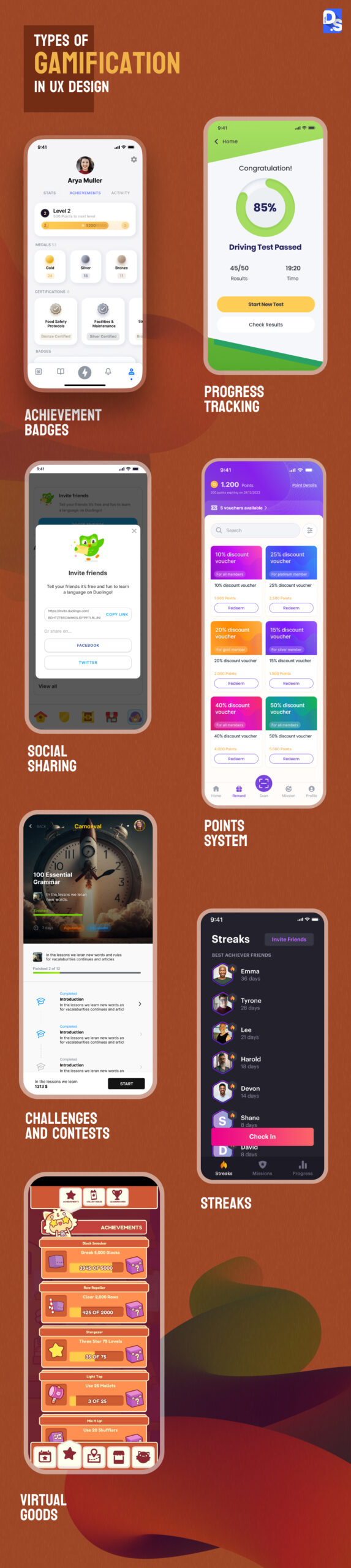
- Keep it Simple: Avoid overwhelming users with excessive information or complex instructions. Instead, use short, focused tutorials that introduce core features gradually. For instance, apps like Duolingo incorporate friendly guidance without inundating new users.
- Utilize Progress Indicators: Show users how far they are in the onboarding process. Progress bars or checklists can motivate users to complete the setup. Additionally, by providing a visual representation of progression, you can foster a sense of accomplishment.
- Allow for Skipping: Recognize that not all users have the same learning preferences or patience. Including an option to skip onboarding can reduce frustration and cater to self-sufficient users who prefer to explore independently.
By implementing these strategies, you can establish a positive first impression that invites exploration rather than discouragement. A thorough analysis indicates that apps with optimized onboarding processes see retention rates rise by approximately 50% during the initial three days of use.
Ensuring Accessibility for All Users
Accessibility in mobile applications is often an overlooked aspect of user experience but is vital for inclusivity. Aiming for broad usability means considering various impairments, whether visual, auditory, or physical. Below are essential practices to enhance accessibility:
- Support Screen Readers: Design your app to be compatible with screen readers, which read aloud the text displayed on the screen for users with visual impairments. Use proper labeling for buttons and form fields to ensure clear communication.
- Contrast and Readability: Ensure text is legible against background colors through appropriate contrast ratios. As per the Web Content Accessibility Guidelines (WCAG), aim for a contrast ratio of at least 4.5:1 for standard text and 3:1 for large text.
- Keyboard Navigation: Many users depend on keyboard navigation instead of touchscreen interactions. Ensure that all functions within the app can be accessed via keyboard shortcuts to facilitate a smoother experience for all users.
With approximately 1 in 5 Americans having some form of disability, prioritizing accessibility can significantly widen your user base. Furthermore, accessible apps reflect a commitment to social responsibility and inclusiveness, creating a positive brand image among users.
Utilizing these insights and techniques to enhance user experience in mobile applications can position your app for success in a competitive environment. By fostering easy navigation and learning, while also advocating for inclusivity, developers can build a user-centric platform that resonates with a diverse audience.
| Advantage | Description |
|---|---|
| Responsive Design | A responsive design ensures that the app adapts seamlessly to various screen sizes, enhancing usability. |
| Intuitive Navigation | Implementing simple and clear navigation aids users in finding what they need quickly and efficiently. |
| Fast Loading Times | Increasing app speed reduces frustration and retains user interest, leading to higher engagement rates. |
| Clear Call-to-Actions | Well-defined call-to-action buttons guide users towards desired actions, improving overall experience. |
Understanding the importance of user-centered design in mobile apps is crucial for enhancing overall user satisfaction. By focusing on these advantages, developers and designers can create impactful solutions for better user experiences. As mobile usage continues to grow, best practices in design are not just beneficial but essential for competing in a crowded market.
DISCOVER MORE: Click here to optimize your cloud storage and save costs
Enhancing Usability through Design Principles
While functionality is paramount, the visual design of your app plays an equally crucial role in shaping user experience. A well-designed interface not only attracts users but also ensures that they can navigate effortlessly. Below are several key design principles aimed at improving usability that every mobile app developer should consider:
Prioritizing Intuitive Navigation
Navigation design can make or break the user experience. A clear, intuitive navigation structure guides users seamlessly through your app, reducing frustration and enhancing engagement. Here are some strategies to ensure your navigation design resonates with users:
- Use Consistent Layouts: A consistent layout across all screens helps users easily locate features and information. For example, social media apps like Instagram utilize a uniform navigation bar that users become familiar with quickly, aiding in fluid navigation.
- Employ Descriptive Labels: Instead of generic terms, use clear and descriptive labels for menu items. Users often prefer intuitive cues that convey functionality at a glance. This small change can significantly reduce cognitive load, allowing users to navigate with confidence.
- Incorporate Gesture-Based Navigation: As touchscreens become the norm, incorporating gestures for key functions enhances usability. For instance, swipe-to-delete functions in apps like Gmail streamline mundane tasks, allowing users to act with simple motions.
Acknowledging the importance of intuitive navigation can lead to decreased bounce rates. Studies indicate that users are more likely to stay engaged and return to apps that offer straightforward navigation options.
Leveraging Feedback Mechanisms
Providing timely feedback during user interactions creates a more engaging experience. Users should know that their actions have been registered and understood. This can be achieved through various methods, including:
- Visual Cues and Animation: Utilize subtle animations or color changes to indicate that a button has been pressed or a task has been initiated. For example, loading indicators can keep users informed during processing times, reducing the likelihood of impatience and frustration.
- In-App Notifications: Use notifications wisely to confirm user actions or inform them of updates. Well-timed notifications, such as a successful settings change, can provide reassurance and enhance user confidence in the app’s capabilities.
- Incorporate User Feedback Loops: Encourage users to provide feedback within the app. A simple star rating after an interaction can not only yield valuable insights but also make users feel valued and heard. Engaging users in this way can improve retention and satisfaction scores.
By implementing feedback mechanisms, you foster a sense of transparency and responsiveness, vital elements that contribute to an effective user experience.
Fine-Tuning App Performance
No matter how well-designed your app is, poor performance can lead to frustration and disengagement. Ensuring optimal performance is essential for a positive user experience. Here are critical techniques for fine-tuning your app’s performance:
- Minimize Load Times: Studies show that users abandon apps that take longer than three seconds to load. Employing strategies like performance optimization and content delivery networks can help minimize loading times significantly.
- Utilize Offline Capabilities: Modern users often expect apps to function without an active internet connection. Offering offline capabilities allows users to access essential features even when they are in areas with poor connectivity, enhancing the overall utility of your app.
- Regular Updates and Maintenance: Continuously monitor app performance and bugs. Implementing regular updates based on user feedback keeps your app running smoothly and shows users that you value their experience, fostering loyalty and trust.
Empowering your app through performance enhancements leads to lower frustration rates and higher user satisfaction. Ultimately, a seamless and responsive experience can drive sustained engagement and growth for your mobile application.
DIVE DEEPER: Click here to optimize your cloud storage costs
Conclusion
Creating an exceptional user experience in mobile apps is not merely a trend—it’s a necessity for success in a competitive digital landscape. By focusing on intuitive navigation, employing effective visual design, and fine-tuning app performance, developers can significantly enhance user satisfaction and engagement. The principles discussed throughout this article serve as a roadmap for turning users into loyal advocates for your app.
Furthermore, understanding and implementing feedback mechanisms can instill a sense of community and trust. Allowing users to share their thoughts fosters a continuous loop of improvement, ensuring that your app evolves with its audience. Continuous performance optimization, including minimizing load times and ensuring features function offline, directly impacts user retention rates—an essential factor for app longevity.
As you delve deeper into enhancing user experience, keep in mind that the mobile landscape is constantly shifting. Staying informed about emerging trends and technologies is pivotal. In a world where user expectations are ever-increasing, those who prioritize user-focused design are not only likely to retain their current user base but also attract new users who appreciate a seamless and engaging mobile experience.
Incorporating these practical tips into your app development strategy can lead to measurable improvements in user satisfaction and retention. The journey to an improved user experience is ongoing, and with a commitment to excellence, your mobile app can thrive in the hands of its users.

Beatriz Johnson is a seasoned tech writer and digital tools expert with a passion for simplifying the complexities of technology and mobile applications. With over a decade of experience in the tech industry, she specializes in topics like productivity apps, software reviews, and emerging digital trends. Through her work, Beatriz empowers readers to make informed technology choices and stay ahead in the ever-changing world of apps and innovation.